Lock in the real-world graph
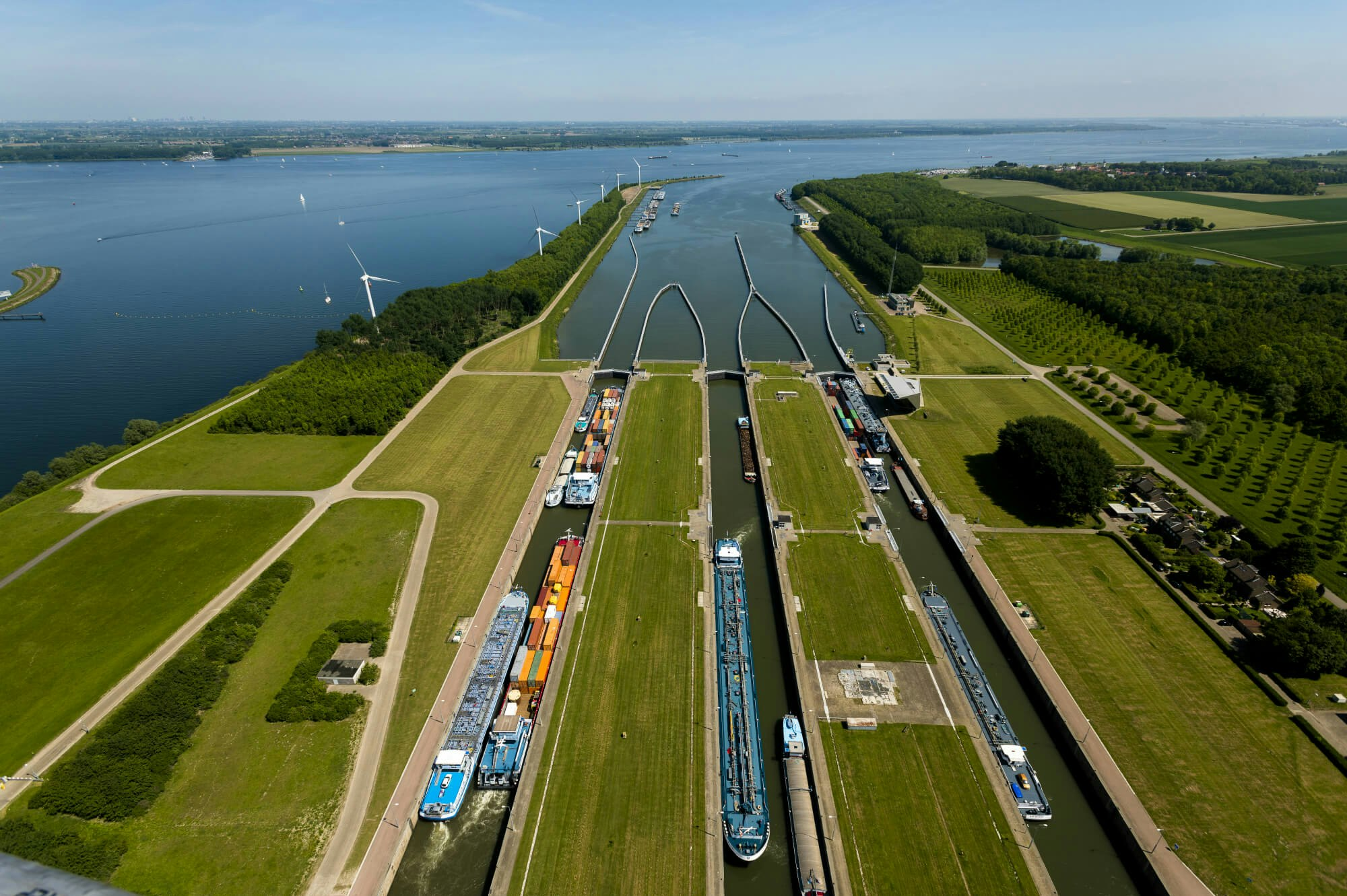
In this notebook, we set up a basic simulation where two vessels cross a lock complex in a real-world graph. We take the eastern lock chamber of the Volkerak sluices (rightern most lock chamber in the picture below).
# package(s) used for creating and geo-locating the graph
import networkx as nx
import pyproj
from shapely.geometry import Point, LineString, Polygon
from shapely.ops import transform

# package to navigate through files and folders
import os

# package(s) related to the simulation (creating the vessel, running the simulation)
import datetime
import simpy
import opentnsim
import opentnsim.fis as fis
from opentnsim.core.logutils import logbook2eventtable
from opentnsim.core.plotutils import generate_vessel_gantt_chart

# import of modules important for locking
from opentnsim.lock import lock as lock_module
from opentnsim.vessel_traffic_service import vessel_traffic_service as vessel_traffic_service_module

# package(s) needed for inspecting the output
import pandas as pd
import matplotlib.pyplot as plt

# package(s) needed for inspecting the output
import pandas as pd
import geopandas as gpd
import numpy as np

# plot libraries
import folium

print("This notebook is executed with OpenTNSim version {}".format(opentnsim.__version__))
c:\Users\alpf\Documents\projecten\openTNSim\OpenTNSim\.venv\Lib\site-packages\requests\__init__.py:86: RequestsDependencyWarning:
Unable to find acceptable character detection dependency (chardet or charset_normalizer).
This notebook is executed with OpenTNSim version 1.3.7
%load_ext autoreload
%autoreload 2
0.2. Functions to be included in the utilities
def find_closest_edge_to_point(graph, point):
    distance_to_edge = {}
    point_transformed = point #flip_coordinates(point)
    for edge in graph.edges(data = True):
        edge_name = (edge[0],edge[1])
        edge_info = edge[2]
        edge_geometry = edge_info["geometry"]
        distance_to_edge[edge_name] = point_transformed.distance(edge_geometry)

    closest_edge = list(distance_to_edge.keys())[np.argmin(list(distance_to_edge.values()))]
    return closest_edge

def get_closest_node_to_point(graph, point):
    closest_edge = find_closest_edge_to_point(graph, point)
    distance_to_node = {}
    point_transformed = point #flip_coordinates(point)
    for node in closest_edge:
        node_geometry = graph.nodes[node]["geometry"]
        distance_to_node[node] = point_transformed.distance(node_geometry)

    closest_node = list(distance_to_node.keys())[np.argmin(list(distance_to_node.values()))]
    return closest_node

def get_closest_location_on_edge_to_point(graph,edge,point):
    edge_geometry = FG.edges[edge]["geometry"]
    point_on_edge = edge_geometry.interpolate(edge_geometry.project(point))
    return point_on_edge

def calculate_distance_along_geometry_to_nodes_of_edge(graph, edge, point):

    edge_geometry = graph.edges[edge]["geometry"]
    return distance_to_start_node, distance_to_end_node

def find_nodes_in_a_polygon(polygon):
    nodes = []
    for node in FG.nodes(data = True):
        node_info = node[1]
        node_geometry = node_info["geometry"]
        if lock_polygon.intersects(node_geometry):
            nodes.append(node[0])
    return nodes

def find_edges_in_a_polygon(polygon):
    edges = []
    for edge in FG.edges(data = True):
        start_node = edge[0]
        end_node = edge[1]
        edge_info = edge[2]
        edge_geometry = edge_info["geometry"]
        if lock_polygon.intersects(edge_geometry):
            edges.append((start_node,end_node))
    return edges

def calculate_length_of_splitted_edge_geometries(graph, edge, edge_geometries):
    edge_geometry_lengths = [edge_geometry.length for edge_geometry in edge_geometries]
    sum_edge_length = np.sum(edge_geometry_lengths)
    fractive_edge_parts_lengths = edge_geometry_lengths/sum_edge_length
    edge_parts_lenghts_m = fractive_edge_parts_lengths*graph.edges[edge]["length_m"]
    return edge_parts_lenghts_m

def find_edges_based_on_shared_node(graph, node):
    edges = []
    for edge in graph.edges:
        if node in edge:
            edges.append(edge)
    return edges

def compare_two_edge_info(edge_A,edge_B):
    edge_info_A = FG.edges[edge_A]
    edge_info_B = FG.edges[edge_B]
    shared_items = {k: edge_info_A[k] for k in edge_info_A if k in edge_info_B and str(edge_info_A[k]) == str(edge_info_B[k])}
    missing_items_A = edge_info_A.keys() - shared_items.keys()
    missing_items_B = edge_info_B.keys() - shared_items.keys()
    return shared_items, missing_items_A, missing_items_B

import pyproj
from shapely.ops import transform

def transform_geometry(geometry, epsg_in = "EPSG:4326", epsg_out = "EPSG:8857"):
    #EPSG:8857 is equal earth projection
    crs_in = pyproj.CRS(epsg_in)
    crs_out = pyproj.CRS(epsg_out)
    crs_in_to_crs_out = pyproj.transformer.Transformer.from_crs(crs_in, crs_out, always_xy=True).transform
    geometry_transformed = transform(crs_in_to_crs_out,geometry)
    return geometry_transformed

def remove_node_from_network(graph, node):
    graph.remove_node(node)
    return

import warnings
from shapely.ops import linemerge
def merge_two_consecutive_edges_based_on_shared_node(graph, node):
    if node not in FG.nodes:
        warnings.warn(f"Node ({node}) does not exist in graph, merging aborted.")
        return

    edges = find_edges_based_on_shared_node(graph, node)
    number_of_edges = len(edges)
    if number_of_edges != 2:
        if number_of_edges > 2:
            warnings.warn(f"Node ({node}) has multiple ({number_of_edges}) edges, merging aborted.")
        else:
            warnings.warn(f"Node ({node}) has only one edge, merging aborted.")
        return

    edge_A, edge_B = edges
    start_junction_id = list(set(edge_A)-set(edge_B))[0]
    end_junction_id = list(set(edge_B)-set(edge_A))[0]

    edge_info_A = FG.edges[edge_A]
    edge_info_B = FG.edges[edge_B]
    edge_geometry_A = FG.edges[edge_A]["geometry"]
    edge_geometry_B = FG.edges[edge_B]["geometry"]
    new_edge_geometry = linemerge([edge_geometry_A,edge_geometry_B])

    shared_items, missing_items_A, missing_items_B = compare_two_edge_info(edge_A,edge_B)
    new_edge_data = shared_items

    new_edge_data['StartJunctionId'] = start_junction_id
    new_edge_data['EndJunctionId'] = end_junction_id
    new_edge_data['GeoType'] = np.nan
    new_edge_data['Wkt'] = str(new_edge_geometry)
    new_edge_data['geometry'] = new_edge_geometry
    new_edge_data['length'] = edge_info_A['length'] + edge_info_B['length']
    new_edge_data['length_m'] = edge_info_A['length_m'] + edge_info_B['length_m']

    if (start_junction_id,end_junction_id) in FG.edges:
        warnings.warn(f"Edge ({start_junction_id},{end_junction_id}) is already part of the network, merging aborted.")
        return

    graph.add_edge(start_junction_id, end_junction_id, **new_edge_data)
    remove_node_from_network(graph,node)
    return

def create_real_world_graph(graph, lat_start = 52.24, lon_start = 5.75, zoom_start = 6):
    # Create a map centered between the two points
    m = folium.Map(location=[lat_start, lon_start], zoom_start = zoom_start, tiles="cartodb positron")

    for edge in graph.edges(data = True):
        points_x = list(edge[2]["geometry"].coords.xy[0])
        points_y = list(edge[2]["geometry"].coords.xy[1])

        line = []
        for i, _ in enumerate(points_x):
            line.append((points_y[i], points_x[i]))

        folium.PolyLine(line, color = "darkgrey", weight = 3, popup = edge[2]["Name"]).add_to(m)

    for node in graph.nodes(data = True):
        point = list(node[1]["geometry"].coords.xy)
        folium.CircleMarker(location=[point[1][0],point[0][0]], color='grey',fill_color = "grey", fill=True, radius = 2, popup = node[0]).add_to(m)

    return m

from scipy.spatial import ConvexHull
from scipy.ndimage import rotate
import math
def get_bounding_rectangle(geometry):
    """
    Find the smallest bounding rectangle for a set of points.
    Returns a set of points representing the corners of the bounding box.

    Parameters
    ----------
    geometry : shapely.geometry.Poylgon
        polygon of the object

    Returns
    -------
    rval : shapely.geometry.Poylgon
        polygon of the bounding rectangle
    """

    geometry_coordinates = geometry.exterior.coords
    points = np.array(geometry_coordinates)

    pi2 = np.pi/2.

    # get the convex hull for the points
    hull_points = points[ConvexHull(points).vertices]

    # calculate edge angles
    edges = np.zeros((len(hull_points)-1, 2))
    edges = hull_points[1:] - hull_points[:-1]

    angles = np.zeros((len(edges)))
    angles = np.arctan2(edges[:, 1], edges[:, 0])

    angles = np.abs(np.mod(angles, pi2))
    angles = np.unique(angles)

    # find rotation matrices
    rotations = np.vstack([
        np.cos(angles),
        np.cos(angles-pi2),
        np.cos(angles+pi2),
        np.cos(angles)]).T

    rotations = rotations.reshape((-1, 2, 2))

    # apply rotations to the hull
    rot_points = np.dot(rotations, hull_points.T)

    # find the bounding points
    min_x = np.nanmin(rot_points[:, 0], axis=1)
    max_x = np.nanmax(rot_points[:, 0], axis=1)
    min_y = np.nanmin(rot_points[:, 1], axis=1)
    max_y = np.nanmax(rot_points[:, 1], axis=1)

    # find the box with the best area
    areas = (max_x - min_x) * (max_y - min_y)
    best_idx = np.argmin(areas)

    # return the best box
    x1 = max_x[best_idx]
    x2 = min_x[best_idx]
    y1 = max_y[best_idx]
    y2 = min_y[best_idx]
    r = rotations[best_idx]

    rval = np.zeros((4, 2))
    rval[0] = np.dot([x1, y2], r)
    rval[1] = np.dot([x2, y2], r)
    rval[2] = np.dot([x2, y1], r)
    rval[3] = np.dot([x1, y1], r)

    bounding_rectangle = Polygon([Point(y,x) for x,y in rval])
    return bounding_rectangle

def determine_object_dimensions_and_alignment(geometry):
    exterior_coords = geometry.exterior.coords
    side_lengths = []
    for i in range(len(exterior_coords) - 1):
        p1 = exterior_coords[i]
        p2 = exterior_coords[i+1]
        length = ((p1[0] - p2[0])**2 + (p1[1] - p2[1])**2)**0.5
        side_lengths.append(length)
    length = np.max(side_lengths)
    width = np.min(side_lengths)

    length_index = int(np.argmax(side_lengths))
    p1 = exterior_coords[length_index]
    p2 = exterior_coords[length_index + 1]

    # Calculate angle in radians
    angle_rad = math.atan2(p2[1] - p1[1], p2[0] - p1[0])

    # Convert to degrees
    angle_deg = math.degrees(angle_rad)
    return length, width, angle_deg

def flip_coordinates(geometry):
    flipped_geometry = transform(lambda x, y: (y, x), geometry)
    return flipped_geometry

from shapely import reverse
def reverse_geometry(geometry):
    reversed_geometry = reverse(geometry)
    return reversed_geometry

def align_network_geometries_with_edge_directions(graph):
    for edge in graph.edges:
        start_node = edge[0]
        end_node = edge[1]
        edge = (start_node, end_node)
        start_node_geometry = graph.nodes[start_node]["geometry"]
        end_node_geometry = graph.nodes[end_node]["geometry"]
        edge_geometry = graph.edges[edge]["geometry"]
        edge_geometry_coordinates_x,edge_geometry_coordinates_y = edge_geometry.coords.xy
        starting_point_edge_geometry = Point(edge_geometry_coordinates_x[0],edge_geometry_coordinates_y[0])
        distance_starting_point_edge_geometry_with_start_node_geometry = starting_point_edge_geometry.distance(start_node_geometry)
        distance_starting_point_edge_geometry_with_end_node_geometry = starting_point_edge_geometry.distance(end_node_geometry)
        if distance_starting_point_edge_geometry_with_start_node_geometry > distance_starting_point_edge_geometry_with_end_node_geometry:
            reversed_edge_geometry = reverse_geometry(edge_geometry)
            graph.edges[edge]["geometry"] = reversed_edge_geometry
            graph.edges[edge]["Wkt"] = str(reversed_edge_geometry)
    return

def find_closest_node_of_edge_to_target_edge(graph, edge, target_edge):
    if edge == target_edge or edge == (target_edge[1], target_edge[0]):
        warnings.warn(f"Edges are the same, start_node of target_edge is returned.")
        return  target_edge[0]

    routes = {}
    for target_node in target_edge:
        for node in edge:
            length_route = len(nx.dijkstra_path(graph,node,target_node))
            if waiting_area_node not in routes.keys() or length_route < routes[waiting_area_node]:
                routes[node] = len(nx.dijkstra_path(graph,node,target_node))
    closest_node_to_lock = min(routes, key=routes.get)
    return closest_node_to_lock

def find_closest_node_of_target_edge_to_geometry(graph, geometry, target_edge):
    distances_to_node = {}
    for node in target_edge:
        node_geometry = graph.nodes[node]["geometry"]
        distances_to_node[node] = node_geometry.distance(geometry)
    closest_node_to_geometry = min(distances_to_node, key=distances_to_node.get)
    return closest_node_to_geometry

from shapely.ops import split
def split_edge_based_on_point_along_edge(graph, edge, point):
    edge_geometry = graph.edges[edge]["geometry"]
    split_point = point.buffer(1e-9)
    if not edge_geometry.intersects(split_point):
        warnings.warn(f"Point is not located along the edge, returned the edge and None.")
        return edge_geometry, None
    splitted_edge_geometries = split(edge_geometry,split_point).geoms
    first_edge_geometry = splitted_edge_geometries[0]
    second_edge_geometry = splitted_edge_geometries[2]
    return first_edge_geometry, second_edge_geometry

def split_edge_based_on_geometry_along_edge(graph, edge, geometry):
    edge_geometry = graph.edges[edge]["geometry"]
    if not edge_geometry.intersects(geometry):
        warnings.warn(f"Geometry is not located along the edge, returned the edge, geometry, and None.")
        return edge_geometry, geometry, None
    splitted_edge_geometries = split(edge_geometry,geometry).geoms
    first_edge_geometry = splitted_edge_geometries[0]
    edge_in_geometry = splitted_edge_geometries[1]
    second_edge_geometry = splitted_edge_geometries[2]
    return first_edge_geometry, edge_in_geometry, second_edge_geometry

def determine_the_distances_from_doors_to_edge_nodes(graph, lock_edge_geometries, lock_edge_lengths):
    distance_from_start_node_to_lock_doors_A = None
    distance_from_end_node_to_lock_doors_B = None
    for geometry_index, geometry in enumerate(lock_edge_geometries):
        distances_to_node = {}
        for lock_node in lock_edge:
           distances_to_node[lock_node] = geometry.distance(graph.nodes[lock_node]["geometry"])
        closest_node = min(distances_to_node, key=distances_to_node.get)
        if distances_to_node[closest_node] > 0.0001:
            geometry_index_name = 'First'
            if geometry_index:
                geometry_index_name = 'Second'
            warnings.warn(f"{geometry_index_name} lock edge geometry does not touch any node")
        lock_node_index = list(distances_to_node.keys()).index(closest_node)
        if not lock_node_index:
            distance_from_start_node_to_lock_doors_A = lock_edge_lengths[geometry_index]
        else:
            distance_from_end_node_to_lock_doors_B = lock_edge_lengths[geometry_index]
    if distance_from_start_node_to_lock_doors_A is None:
        warnings.warn(f"Distance_from_start_node_to_lock_doors_A not found")
    if distance_from_end_node_to_lock_doors_B is None:
        warnings.warn(f"Distance_from_end_node_to_lock_doors_B not found")
    return distance_from_start_node_to_lock_doors_A, distance_from_end_node_to_lock_doors_B
1. Define object classes
# make your preferred Vessel class out of available mix-ins.
Vessel = type(
    "Vessel",
    (
        lock_module.PassesLockComplex,             # allows to interact with a lock
        opentnsim.core.Identifiable,               # allows to give the object a name and a random ID,
        opentnsim.core.Movable,                    # allows the object to move, with a fixed speed, while logging this activity
        opentnsim.core.VesselProperties,           # allows vessel to have dimensions, namely a length (L), width (B), and draught (T)
        opentnsim.core.ExtraMetadata,              # allow additional information, such as an arrival time (required for passing a lock)
        opentnsim.mixins.HasMultiDiGraph,           # allow to operate on a graph that can include parallel edges from and to the same nodes
        opentnsim.output.HasOutput,                # allow additional output to be stored
    ),
    {}
)
2 Create graph
2.1 Import FIS graph
Next we create a network (a graph) along which the vessel can move. For this case we use the Fairway Information System graph, and make the vessels sail from one side of the lock to another side.
# load the processed version from the Fairway Information System graph provided by Rijkswaterstaat
FG = fis.load_network(version="0.3")
#m = create_real_world_graph(FG)
#mFrom the above map we select the following origin and destination pair for the vessels
node_A = '8860743'
node_B = '8866727'
2.2 Modify the FIS graph
We have to check if there are nodes within the lock chamber geometry. This is not supported by OpenTNSim, and we need to manually remove these nodes and merge the edges to a single edge. Let’s first import the lock chamber geometry, which we downloaded using OpenStreetMap (OSM) through overpass turbo (see link).
path = os.getcwd()
lock_geometry = gpd.read_file(os.path.join(path, "data", "lock_chamber.geojson"))
We can plot this geometry into the folium map by reconfiguring the coordinates of the lock chamber’s polygon geometry:
lock_polygon = lock_geometry.geometry.iloc[0]
lock_polygon_transformed = transform(lambda x, y: (y, x), lock_polygon)
lock_coordinates = lock_polygon_transformed.exterior.coords
sub_FG = FG.subgraph(nx.dijkstra_path(FG, node_A, node_B))
m = create_real_world_graph(sub_FG, lat_start = 51.69, lon_start = 4.41, zoom_start = 14)
folium.Polygon(lock_coordinates).add_to(m)
#display
mThere are nodes within the lock geometry, which we have to find, merge their edges and remove.
nodes_within_the_lock_chamber = find_nodes_in_a_polygon(lock_polygon)
for node in nodes_within_the_lock_chamber:
    merge_two_consecutive_edges_based_on_shared_node(FG,node)
sub_FG = FG.subgraph(nx.dijkstra_path(FG, node_A, node_B))
m = create_real_world_graph(sub_FG, lat_start = 51.69, lon_start = 4.41, zoom_start = 14)
folium.Polygon(lock_coordinates).add_to(m)
#display
mfor i,edge in enumerate(sub_FG.edges):
edge_geometry = sub_FG.edges[edge]["geometry"]
edge_geometry_m = transform_geometry(edge_geometry, epsg_out = "EPSG:28992")
edge_geometry_length = edge_geometry_m.length
sub_FG.edges[edge]["length_m"] = edge_geometry_length2.3 Derive lock information
First identify at which edge the lock chamber is located:
lock_node_A, lock_node_B = find_edges_in_a_polygon(lock_polygon)[0]
lock_edge = (lock_node_A, lock_node_B)
Next, we need to derive the lock dimensions, which we can do using a bounding box polygon
bounding_rectange_transformed = get_bounding_rectangle(lock_polygon)
bounding_rectange = flip_coordinates(bounding_rectange_transformed)
bounding_rectange_m = transform_geometry(bounding_rectange, epsg_out = "EPSG:28992")
Distances from the gates to the edge’s start and end node
# split the lock edge in three parts
first_part_edge, lock_part_edge, second_part_edge = split_edge_based_on_geometry_along_edge(FG,lock_edge,bounding_rectange)

# determine the length of the different parts
edge_geometries = [first_part_edge,lock_part_edge,second_part_edge]
edge_lenghts = calculate_length_of_splitted_edge_geometries(FG, lock_edge, edge_geometries)

# select the geometries and length of the part of the edges that do not contain the lock chamber itself
lock_edge_geometries = [first_part_edge, second_part_edge]
lock_edge_lengths = [edge_lenghts[0],edge_lenghts[-1]]

# determine the distances of the edge parts
distance_from_start_node_to_lock_doors_A, distance_from_end_node_to_lock_doors_B = determine_the_distances_from_doors_to_edge_nodes(FG, lock_edge_geometries, lock_edge_lengths)
The lock dimensions
# we already calculated the length of the lock chamber
lock_length = edge_lenghts[1]

# we wrote a function to calculate the other dimensions of the lock chamber
_, lock_width, rotation = determine_object_dimensions_and_alignment(bounding_rectange_m)

# as the length also include two mitre lock gates (length of two times half the lock width) and a safety marging, lets say 15 m at both lock doors, the length capacity would be:
lock_length_capacity = np.floor((lock_length - lock_width - 2*15)/10)*10 # ~301.5 m in reality
lock_width_capacity = np.floor(lock_width) # 24.1 m in reality
lock_depth = 6.2
The waiting areas and their distances to the lock doors
# roughly determine the waiting area coordinates using google earth
waiting_area_A_geometry = Point(4.420425,51.696497)
waiting_area_B_geometry = Point(4.395560,51.683439)

# get the closest nodes and edges where the waiting areas are located
node_waiting_area_A = get_closest_node_to_point(FG,waiting_area_A_geometry)
node_waiting_area_B = get_closest_node_to_point(FG,waiting_area_B_geometry)
edge_waiting_area_A = find_closest_edge_to_point(FG,waiting_area_A_geometry)
edge_waiting_area_B = find_closest_edge_to_point(FG,waiting_area_B_geometry)

# get routes to the lock
route_to_lock_edge_from_waiting_area_A = nx.dijkstra_path(FG,node_waiting_area_A,lock_node_A)
route_to_lock_edge_from_waiting_area_B = nx.dijkstra_path(FG,node_waiting_area_B,lock_node_B)

# get the location along this edge at which the waiting area is located
waiting_area_location_on_edge_waiting_area_A = get_closest_location_on_edge_to_point(FG, edge_waiting_area_A, waiting_area_A_geometry)
waiting_area_location_on_edge_waiting_area_B = get_closest_location_on_edge_to_point(FG, edge_waiting_area_B, waiting_area_B_geometry)

# get the splitted edges
edge_waiting_area_A_geometry_splitted = split_edge_based_on_point_along_edge(FG,edge_waiting_area_A,waiting_area_location_on_edge_waiting_area_A)
edge_waiting_area_B_geometry_splitted = split_edge_based_on_point_along_edge(FG,edge_waiting_area_B,waiting_area_location_on_edge_waiting_area_B)

# determine their lengths
edge_lenghts_waiting_area_A = calculate_length_of_splitted_edge_geometries(FG, edge_waiting_area_A, edge_waiting_area_A_geometry_splitted)
edge_lenghts_waiting_area_B = calculate_length_of_splitted_edge_geometries(FG, edge_waiting_area_B, edge_waiting_area_B_geometry_splitted)
# determine distance to node directed to the lock chamber
edge_waiting_area_B_in_route_to_lock = edge_waiting_area_B[0] in route_to_lock_edge_from_waiting_area_B and edge_waiting_area_B[1] in route_to_lock_edge_from_waiting_area_B
distance_lock_doors_B_to_waiting_area_B = 0.0
if edge_waiting_area_B_in_route_to_lock:
distance_lock_doors_B_to_waiting_area_B += np.max(edge_lenghts_waiting_area_B)
remaining_route_to_lock_doors_B = route_to_lock_edge_from_waiting_area_B[1:]
else:
distance_lock_doors_B_to_waiting_area_B += np.min(edge_lenghts_waiting_area_B)
remaining_route_to_lock_doors_B = route_to_lock_edge_from_waiting_area_B
if len(remaining_route_to_lock_doors_B) >= 2:
for edge_start_node, edge_end_node in zip(remaining_route_to_lock_doors_B[:-1],remaining_route_to_lock_doors_B[1:]):
edge_info = FG.edges[(edge_start_node,edge_end_node)]
distance_lock_doors_B_to_waiting_area_B += edge_info["length_m"]
if edge_waiting_area_B != lock_edge:
distance_lock_doors_B_to_waiting_area_B += distance_from_end_node_to_lock_doors_B
else:
distance_lock_doors_B_to_waiting_area_B = np.max(edge_lenghts_waiting_area_B) - distance_from_end_node_to_lock_doors_A - lock_lengthedge_waiting_area_A_in_route_to_lock = edge_waiting_area_A[0] in route_to_lock_edge_from_waiting_area_A and edge_waiting_area_A[1] in route_to_lock_edge_from_waiting_area_A
distance_lock_doors_A_to_waiting_area_A = 0.0
if edge_waiting_area_A_in_route_to_lock:
distance_lock_doors_A_to_waiting_area_A += np.max(edge_lenghts_waiting_area_A)
remaining_route_to_lock_doors_A = route_to_lock_edge_from_waiting_area_A[1:]
else:
distance_lock_doors_A_to_waiting_area_A += np.min(edge_lenghts_waiting_area_A)
remaining_route_to_lock_doors_A = route_to_lock_edge_from_waiting_area_A
if len(remaining_route_to_lock_doors_A) >= 2:
for edge_start_node, edge_end_node in zip(remaining_route_to_lock_doors_A[:-1],remaining_route_to_lock_doors_A[1:]):
edge_info = FG.edges[(edge_start_node,edge_end_node)]
distance_lock_doors_A_to_waiting_area_A += edge_info["length_m"]
if edge_waiting_area_A != lock_edge:
distance_lock_doors_A_to_waiting_area_A += distance_from_start_node_to_lock_doors_A
else:
distance_lock_doors_A_to_waiting_area_A = np.max(edge_lenghts_waiting_area_A) - distance_from_end_node_to_lock_doors_B - lock_lengthdef mission(env, vessel):
"""
Method that defines the mission of the vessel.
In this case:
keep moving along the path until its end point is reached
"""
while True:
yield from vessel.move()
if vessel.geometry == nx.get_node_attributes(env.graph, "geometry")[vessel.route[-1]]:
break# start simpy environment
simulation_start = datetime.datetime(2025, 1, 1, 0, 0, 0)
env = simpy.Environment(initial_time=simulation_start.timestamp())
env.epoch = simulation_start
# add graph to environment
env.graph = FG
# add components important for locking to the environment
env.vessel_traffic_service = vessel_traffic_service_module.VesselTrafficService(graph=sub_FG, crs_m = "EPSG:28992") #Amersfoort / RD New reference system3.2 Create lock object
lock = lock_module.IsLockComplex(
    env = env,
    name = 'Lock',
    node_open = lock_node_A,
    node_A = lock_node_A,
    node_B = lock_node_B,
    edge_waiting_area_A = edge_waiting_area_A,
    edge_waiting_area_B = edge_waiting_area_B,
    distance_lock_doors_A_to_waiting_area_A = distance_lock_doors_A_to_waiting_area_A,
    distance_lock_doors_B_to_waiting_area_B = distance_lock_doors_B_to_waiting_area_B,
    distance_from_start_node_to_lock_doors_A = distance_from_start_node_to_lock_doors_A,
    distance_from_end_node_to_lock_doors_B = distance_from_end_node_to_lock_doors_B,
    lock_length = lock_length,
    lock_width = lock_width,
    lock_depth = lock_depth,
    levelling_time = 300,
    sailing_distance_to_crossing_point = 300,
    doors_opening_time= 300,
    doors_closing_time= 300,
    speed_reduction_factor_lock_chamber=0.25,
    sailing_in_time_gap_through_doors = 240,
    sailing_in_speed_sea = 1.5,
    sailing_in_speed_canal = 1.5,
    sailing_out_time_gap_through_doors = 60,
    sailing_time_before_opening_lock_doors = 600,
    sailing_time_before_closing_lock_doors = 120,
    registration_nodes = [node_A, node_B],
)
3.3 Create vessels
# create vessels from dict
data_vessel_1 = {
    "env": env,                                          # needed for simpy simulation
    "name": "Vessel 1",                                  # required by Identifiable
    "geometry": env.graph.nodes[node_A]['geometry'],        # required by Locatable
    "route": nx.dijkstra_path(env.graph, node_A, node_B),      # required by Routeable
    "v": 4,                                              # required by Movable, 4 m/s to check if the distance is covered in the expected time
    "L": 100,                                            # required by VesselProperties, interacts with the lock capacity
    "B": 20,                                             # required by VesselProperties
    "T": 10,                                             # required by VesselProperties
    "type": 'tanker',                                    # required by VesselProperties
    "arrival_time": pd.Timestamp('2025-01-01 00:00:00')  # required by PassesLockComplex
}
vessel_1 = Vessel(**data_vessel_1)
vessel_1.name = 'Vessel 1'

data_vessel_2 = {
    "env": env,                                          # needed for simpy simulation
    "name": "Vessel 2",                                  # required by Identifiable
    "geometry": env.graph.nodes[node_B]['geometry'],        # required by Locatable
    "route": nx.dijkstra_path(env.graph, node_B, node_A),      # required by Routeable
    "v": 4,                                              # required by Movable, 4 m/s to check if the distance is covered in the expected time
    "L": 100,                                            # required by VesselProperties, interacts with the lock capacity
    "B": 20,                                             # required by VesselProperties
    "T": 10,                                             # required by VesselProperties
    "type": 'tanker',                                    # required by VesselProperties
    "arrival_time": pd.Timestamp('2025-01-01 00:05:00')  # required by PassesLockComplex
}
vessel_2 = Vessel(**data_vessel_2)
vessel_2.name = 'Vessel 2'

# start the simulation
env.process(mission(env, vessel_1))
env.process(mission(env, vessel_2))
env.run()distance_lock_doors_B_to_waiting_area_Bnp.float64(1080.1020142734922)# We can plot the time-distance diagram
lock.create_time_distance_plot(
vessels = [vessel_1,vessel_2],
xlimmin = -3000,
xlimmax = 3000,
method = 'Plotly'
)# load the logbook data into a dataframe
df = pd.DataFrame.from_dict(vessel_1.logbook)
print("'{}' logbook data:".format(vessel_1.name))
print('')
display(df)'Vessel 1' logbook data:
# load the logbook data into a dataframe
df = pd.DataFrame.from_dict(vessel_2.logbook)

print("'{}' logbook data:".format(vessel_2.name))
print('')

display(df)
'Vessel 2' logbook data:
pd.Timedelta(minutes=31,seconds=10)-pd.Timedelta(minutes=19,seconds=49)-pd.Timedelta(minutes=6,seconds=45)Timedelta('0 days 00:04:36')